ROS2-FishBot建图与导航
固件烧录
相较于从源码编译固件后下载到开发板,使用官方提供的固件文件烧录更为方便。
FishBot官方提供了固件下载工具fishbot_tool:
主控板烧录
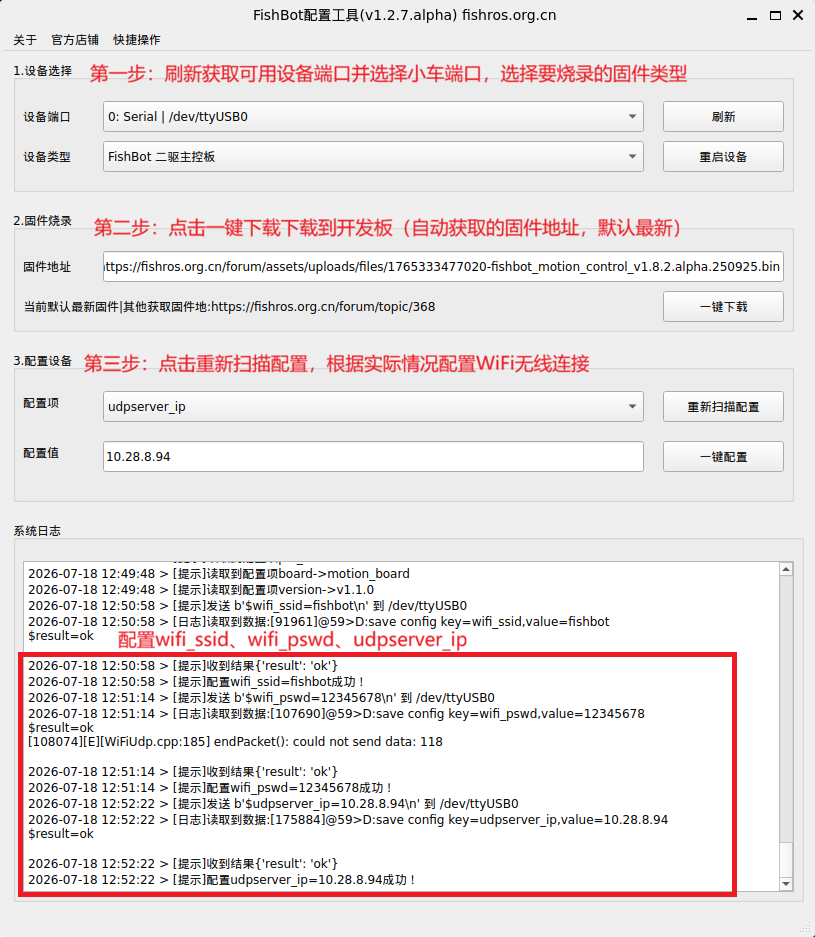
USB连接电脑与主控板,Windows双击下载的fishbot_tool.v1.2.7.alpha.win.exe运行,Linux赋予执行权限后运行./fishbot_tool.v1.2.7.alpha.linux_amd64,界面如下:
插上OLED显示屏,运行Agent,点击开发板上的RST键重启,OLED显示屏上会显示无线连接信息。
mode:udp_client
time: 13:35:38
ip: 10.28.8.129
voltage: 11.97
linear: 0.00
angular: 0.00
上位机可见节点与话题:
ros2 node list
/fishbot_motion_control
ros2 topic list
/cmd_vel
/imu
/odom
/parameter_events
/rosout
雷达转接板烧录
雷达转接板使用跳线帽切换工作模式:
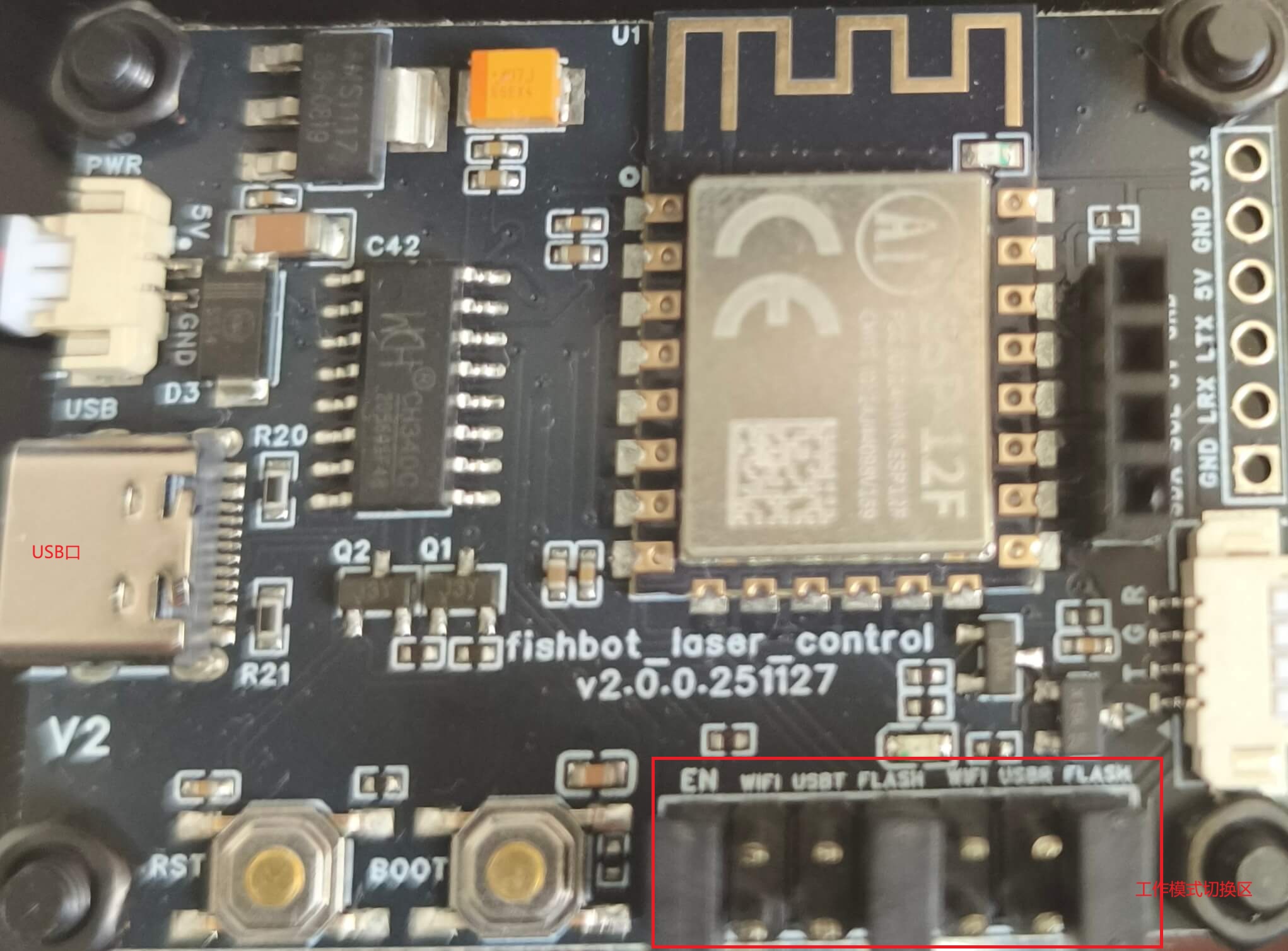
跳线帽可看做一种可插拔的开关,用于断开和连接电路板上的两个触点
- Flash模式:用于烧录固件和参数配置,跳线帽插在
En、Flash、Flash三个位置 - Uart有线模式:用于有线连接,跳线帽插在
USBT、USBR两个位置 - WiFi无线模式:用于无线连接,跳线帽插在
EN、WIFI、WIFI三个位置
首先烧录固件:拔插跳线帽将雷达转接板设置为Flash模式,USB连接电脑与雷达转接板,启动fishbot_tool,设备类型选择FishBot 雷达转接板,选择设备端口,一键下载。
重新扫描配置,修改无线网络配置:wifi_ssid、wifi_pswd、server_ip,分别一键配置。(server_port默认8889)
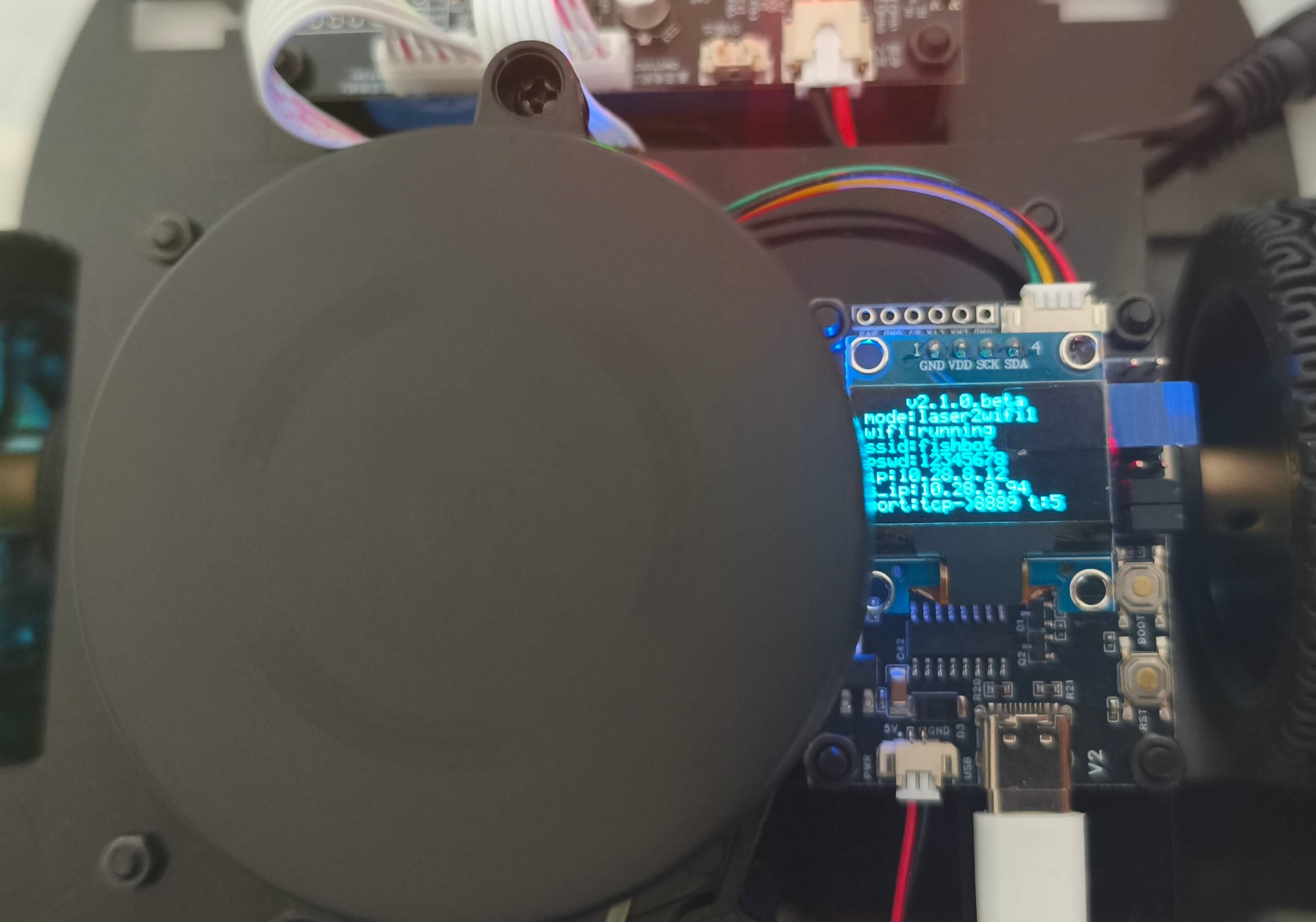
将雷达转接板设置为WiFi模式,OLED插在雷达转接板上,使用nc监听8889端口,点击开发板上的RST键重启,OLED显示屏上会显示无线连接信息,雷达会开始旋转。
# 只做接收测试使用,OLED状态会显示wifi:running
nc -l 8889
雷达驱动测试
有线驱动
使用雷达驱动ROS2功能包ydlidar_ros2:
首先创建工作空间并下载源码
mkdir -p ~/fishbot_ws/src
cd ~/fishbot_ws/src
git clone http://github.fishros.org/https://github.com/fishros/ydlidar_ros2 -b  v1.0.0/fishbot
修改配置ydlidar_ros2/params/ydlidar.yaml中的设备端口
ydlidar_node:
  ros__parameters:
    port: /dev/ttyUSB0
    frame_id: laser_link
    ignore_array: ""
编译
cd ydlidar_ros2
colcon build
修改权限,设置环境。
将雷达转接板设置为Uart有线模式,USB连接电脑与雷达转接板。运行
sudo chmod 666 /dev/ttyUSB0
source install/setup.bash
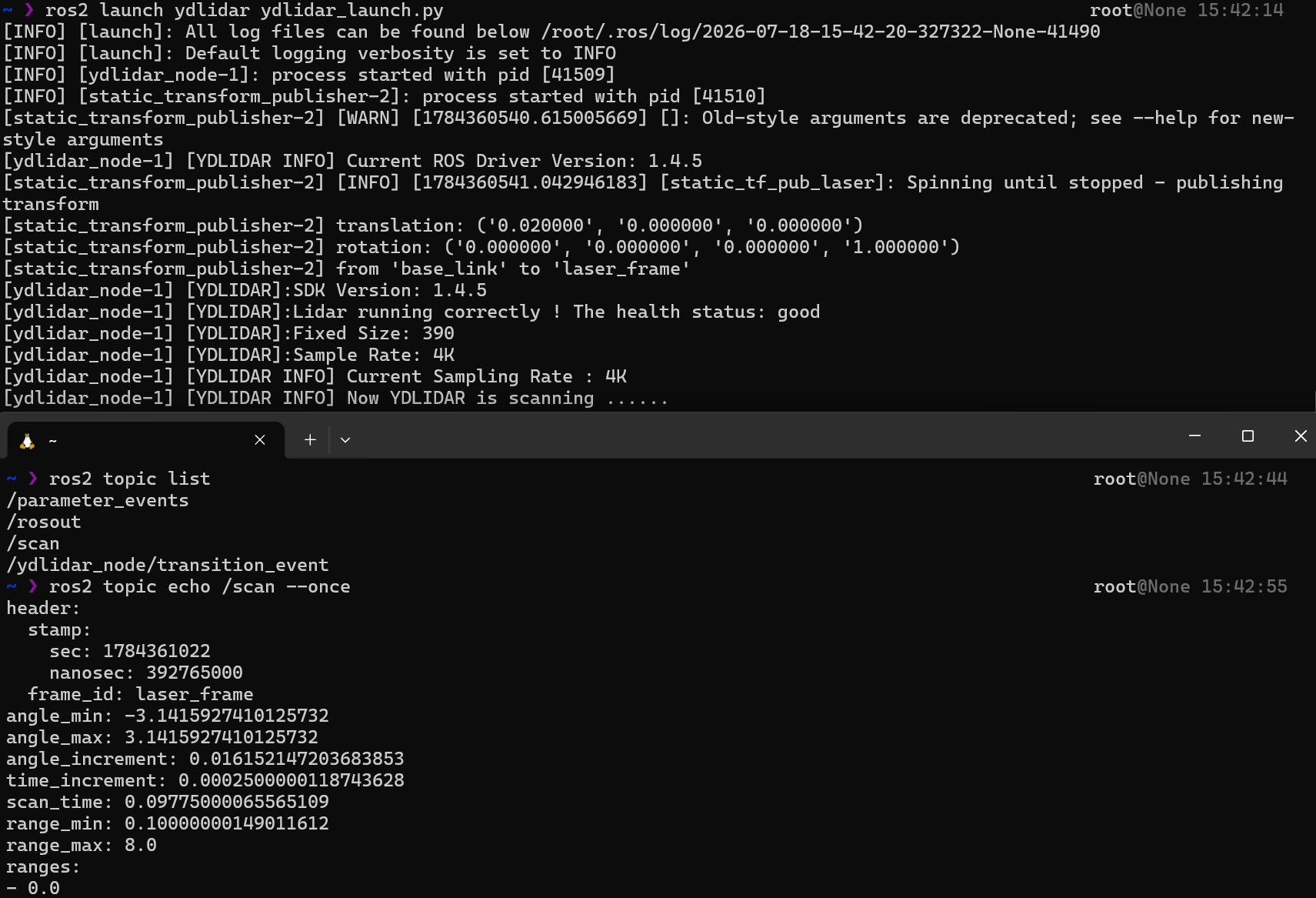
ros2 launch ydlidar ydlidar_launch.py
此时上位机中可以看到/scan话题
使用rviz2进行可视化
rviz2
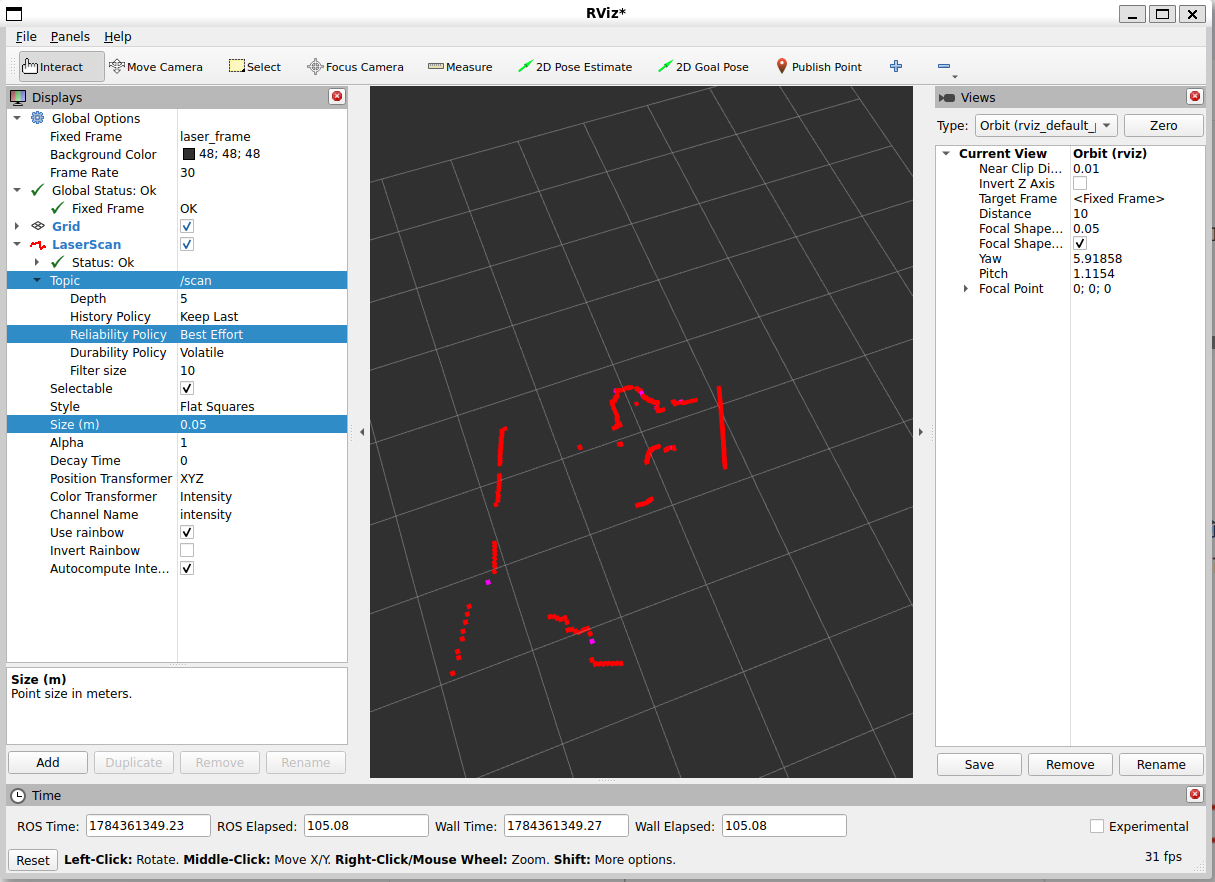
添加LaserScan插件,选择话题/scan,将QoS设置从Reliable修改为Best Effort,即可看到雷达扫描数据。可适当增加Size参数
无线驱动
python脚本生成虚拟串口:
#!/usr/bin/env python3

import subprocess
import os
import pty
import socket
import select
import argparse
import subprocess
import time

class LaserScanRos2():

    def __init__(self) -> None:
        self.laser_pro = None


class SocketServer():
    def __init__(self,lport=8889,uart_name="/tmp/fishbot_laser") -> None:
        self.lport = lport
        self.uart_name = uart_name
        self.laser_ros2 = LaserScanRos2()
        self.main()

    def main(self):
        s = socket.socket(socket.AF_INET, socket.SOCK_STREAM)
        s.setsockopt(socket.SOL_SOCKET, socket.SO_REUSEADDR, 1)
        s.bind(('0.0.0.0', self.lport))
        s.listen(5)
        master, slave = pty.openpty()
        if os.path.exists(self.uart_name):
            os.remove(self.uart_name)
        os.symlink(os.ttyname(slave), self.uart_name)
        print(f"UART2SOCKET:{self.lport}->{self.uart_name}")
        mypoll = select.poll()
        mypoll.register(master, select.POLLIN)
        try:
            while True:
                print("Prepare to Accept connect!")
                client, client_address = s.accept()
                mypoll.register(client.fileno(), select.POLLIN)
                print(s.fileno(), client, master)
                print('PTY: Opened {} for {}:{}'.format(
                    os.ttyname(slave), '0.0.0.0', self.lport))
                is_connect = True
                try:
                    while is_connect:
                        fdlist = mypoll.poll(256)
                        for fd, event in fdlist:
                            data = os.read(fd, 256)
                            write_fd = client.fileno() if fd == master else master
                            if len(data) == 0:
                                is_connect = False
                                break
                            os.write(write_fd, data)
                            # print(fd, event, data)
                except ConnectionResetError:
                    is_connect = False
                    print("远程被迫断开链接")
                finally:
                    mypoll.unregister(client.fileno())
        finally:
            s.close()
            os.close(master)
            os.close(slave)
            os.remove(self.uart_name)

def main():
    SocketServer()


if __name__ == "__main__":
    main()
以上脚本生成了一个虚拟串口/tmp/fishbot_laser,将8889端口的数据转发到该串口。
雷达数据→上位机8889端口→虚拟串口/tmp/fishbot_laser→ydlidar_ros2驱动→ROS2话题/scan
修改雷达转接板工作模式为WiFi无线模式,运行Python脚本。
python3 virt_serial.py
修改配置,重新编译,启动ydlidar_ros2驱动
ydlidar_node:
  ros__parameters:
    port: /tmp/fishbot_laser # 设置虚拟串口
    frame_id: laser_link # 之后使用
    ignore_array: ""
colcon build
source install/setup.bash
ros2 launch ydlidar ydlidar_launch.py
上位机中可见/scan话题。
ros2 topic list
/parameter_events
/rosout
/scan
/tf_static
/ydlidar_node/transition_event
建图
坐标系规定
REP105中规定了用于 ROS 的移动平台的坐标系的命名约定和语义含义。
REP105规定了坐标系规范:
map:世界固定全局坐标系,通常是静态的,表示世界的固定参考框架。odom:世界固定局部坐标系,里程计坐标系,表示机器人在一段时间内的运动估计,通常是动态的。base_link:机器人本体坐标系,作为传感器和执行器的父级。
它们间的TF变换树结构为
map -> odom -> base_link。
如果加上世界定位earth、传感器,TF变换树可扩展为
earth -> map -> odom -> base_link -> laser/imu/...。
map和odom都是世界固定的,它们间的区别是:
map无漂移但不连续,相较于odom更加稳定odom连续平滑但有漂移,相较于map更加实时平滑- 两者通过动态变换
map -> odom进行关联,通常由SLAM算法计算得到。
发布odomTF变换
创建工作空间和功能包
mkdir -p ~/fishbot_ws/src
cd ~/fishbot_ws/src
ros2 pkg create --build-type ament_cmake fishbot_bringup
touch fishbot_bringup/src/fishbot_bringup.cpp
修改CMakeLists.txt,添加依赖
cmake_minimum_required(VERSION 3.20)
project(fishbot_bringup)

if(CMAKE_COMPILER_IS_GNUCXX OR CMAKE_CXX_COMPILER_ID MATCHES "Clang")
  add_compile_options(-Wall -Wextra -Wpedantic)
endif()

# find dependencies
find_package(ament_cmake REQUIRED)
find_package(rclcpp REQUIRED)
find_package(geometry_msgs REQUIRED)
find_package(nav_msgs REQUIRED)
find_package(tf2 REQUIRED)
find_package(tf2_ros REQUIRED)


set(dependencies
  rclcpp
  geometry_msgs
  nav_msgs
  tf2
  tf2_ros
)

add_executable(fishbot_bringup src/fishbot_bringup.cpp)
target_include_directories(fishbot_bringup PUBLIC
  $<BUILD_INTERFACE:${CMAKE_CURRENT_SOURCE_DIR}/include>
  $<INSTALL_INTERFACE:include>)
target_compile_features(fishbot_bringup PUBLIC c_std_99 cxx_std_17)  # Require C99 and C++17

ament_target_dependencies(fishbot_bringup
  ${dependencies}
)
install(TARGETS fishbot_bringup
  DESTINATION lib/${PROJECT_NAME})

if(BUILD_TESTING)
  find_package(ament_lint_auto REQUIRED)
  # the following line skips the linter which checks for copyrights
  # comment the line when a copyright and license is added to all source files
  set(ament_cmake_copyright_FOUND TRUE)
  # the following line skips cpplint (only works in a git repo)
  # comment the line when this package is in a git repo and when
  # a copyright and license is added to all source files
  set(ament_cmake_cpplint_FOUND TRUE)
  ament_lint_auto_find_test_dependencies()
endif()

ament_package()
编写代码fishbot_bringup/src/fishbot_bringup.cpp,发布odom->base_linkTF变换
#include <rclcpp/rclcpp.hpp>
#include <nav_msgs/msg/odometry.hpp>
#include <tf2/utils.h>
#include <tf2_ros/transform_broadcaster.h>

class TopicSubscribe01 : public rclcpp::Node
{
public:
  TopicSubscribe01(std::string name) : Node(name)
  {
    // 创建一个订阅者,订阅"odom"话题的nav_msgs::msg::Odometry类型消息
    odom_subscribe_ = this->create_subscription<nav_msgs::msg::Odometry>(
      "odom", rclcpp::SensorDataQoS(),
      std::bind(&TopicSubscribe01::odom_callback, this, std::placeholders::_1));

    // 创建一个tf2_ros::TransformBroadcaster用于广播坐标变换
    tf_broadcaster_ = std::make_unique<tf2_ros::TransformBroadcaster>(this);
  }

private:
  rclcpp::Subscription<nav_msgs::msg::Odometry>::SharedPtr odom_subscribe_;
  std::unique_ptr<tf2_ros::TransformBroadcaster> tf_broadcaster_;
  nav_msgs::msg::Odometry odom_msg_;

  // 回调函数,处理接收到的odom消息
  void odom_callback(const nav_msgs::msg::Odometry::SharedPtr msg)
  {
    (void)msg;
    RCLCPP_INFO(this->get_logger(), "接收到里程计信息->底盘坐标系 tf :(%f,%f)",
                msg->pose.pose.position.x, msg->pose.pose.position.y);

    // 更新odom_msg_的姿态信息
    odom_msg_.pose.pose.position.x = msg->pose.pose.position.x;
    odom_msg_.pose.pose.position.y = msg->pose.pose.position.y;
    odom_msg_.pose.pose.position.z = msg->pose.pose.position.z;

    odom_msg_.pose.pose.orientation.x = msg->pose.pose.orientation.x;
    odom_msg_.pose.pose.orientation.y = msg->pose.pose.orientation.y;
    odom_msg_.pose.pose.orientation.z = msg->pose.pose.orientation.z;
    odom_msg_.pose.pose.orientation.w = msg->pose.pose.orientation.w;
  };

public:
  // 发布坐标变换信息
  void publish_tf()
  {
    geometry_msgs::msg::TransformStamped transform;
    double seconds = this->now().seconds();
    transform.header.stamp = rclcpp::Time(static_cast<uint64_t>(seconds * 1e9));
    transform.header.frame_id = "odom";
    transform.child_frame_id = "base_footprint";

    transform.transform.translation.x = odom_msg_.pose.pose.position.x;
    transform.transform.translation.y = odom_msg_.pose.pose.position.y;
    transform.transform.translation.z = odom_msg_.pose.pose.position.z;
    transform.transform.rotation.x = odom_msg_.pose.pose.orientation.x;
    transform.transform.rotation.y = odom_msg_.pose.pose.orientation.y;
    transform.transform.rotation.z = odom_msg_.pose.pose.orientation.z;
    transform.transform.rotation.w = odom_msg_.pose.pose.orientation.w;

    // 广播坐标变换信息
    tf_broadcaster_->sendTransform(transform);
  }
};

int main(int argc, char **argv)
{
  // 初始化ROS节点
  rclcpp::init(argc, argv);

  // 创建一个TopicSubscribe01节点
  auto node = std::make_shared<TopicSubscribe01>("fishbot_bringup");

  // 设置循环频率
  rclcpp::WallRate loop_rate(20.0);
  while (rclcpp::ok())
  {
    // 处理回调函数
    rclcpp::spin_some(node);

    // 发布坐标变换信息
    node->publish_tf();

    // 控制循环频率
    loop_rate.sleep();
  }

  // 关闭ROS节点
  rclcpp::shutdown();
  return 0;
}
以上代码创建了一个名为fishbot_bringup的ROS2节点,订阅了/odom话题,并将接收到的里程计信息发布为odom->base_footprint的TF变换。
base_footprint通常表示机器人与地面的接触平面,更接近机器人在地面上的实际位置,有助于避免碰撞。而在其他情况下,如控制机器人的运动,使用base_link可能更合适,因为它更直接地与机器人的物理结构相联系。
编译运行
cd ~/fishbot_ws
colcon build
source install/setup.bash
ros2 run fishbot_bringup fishbot_bringup
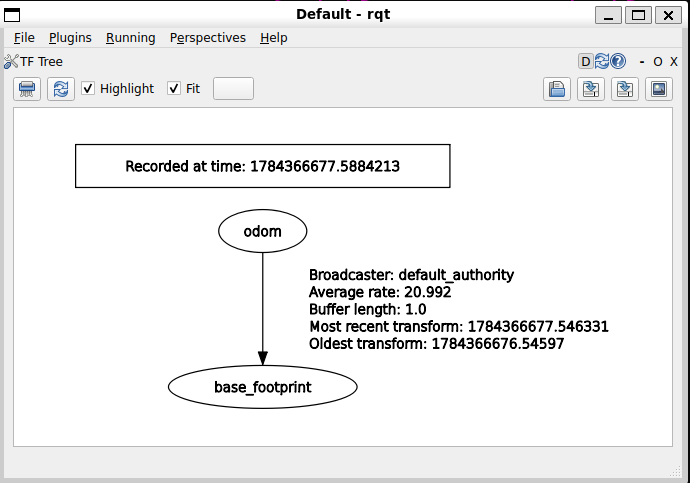
启动Micro-ROS Agent发布/odom话题,然后启动rqt可视化TF变换树
rqt
选择Plugins -> Visualization -> TF Tree,即可看到odom -> base_footprintTF变换树结构。
扩展TF树,发布小车TF变换
新建功能包和URDF文件
cd ~/fishbot_ws/src
ros2 pkg create --build-type ament_python fishbot_description
mkdir -p fishbot_description/urdf
touch fishbot_description/urdf/fishbot.urdf
编辑fishbot_description/urdf/fishbot.urdf,描述小车的URDF模型
<?xml version="1.0"?>
<robot name="fishbot">
  <link name="base_footprint" />

  <!-- base link -->
  <link name="base_link">
  <visual>
    <origin xyz="0 0 0.0" rpy="0 0 0" />
    <geometry>
      <cylinder length="0.12" radius="0.10" />
    </geometry>
    <material name="blue">
      <color rgba="0.1 0.1 1.0 0.5" />
    </material>
  </visual>
  </link>
  <joint name="base_joint" type="fixed">
    <parent link="base_footprint" />
    <child link="base_link" />
    <origin xyz="0.0 0.0 0.076" rpy="0 0 0" />
  </joint>

  <!-- laser link -->
  <link name="laser_link">
  <visual>
    <origin xyz="0 0 0" rpy="0 0 0" />
    <geometry>
      <cylinder length="0.02" radius="0.02" />
    </geometry>
    <material name="black">
      <color rgba="0.0 0.0 0.0 0.5" />
    </material>
  </visual>
  </link>
  <joint name="laser_joint" type="fixed">
    <parent link="base_link" />
    <child link="laser_link" />
    <origin xyz="0 0 0.075" rpy="0 0 0" />
  </joint>

</robot>
修改fishbot_description/setup.py,添加安装URDF文件
from setuptools import setup
from glob import glob
import os

package_name = 'fishbot_description'

setup(
    name=package_name,
    version='0.0.0',
    packages=[package_name],
    data_files=[
        ('share/ament_index/resource_index/packages',
            ['resource/' + package_name]),
        ('share/' + package_name, ['package.xml']),
        (os.path.join('share', package_name, 'launch'), glob('launch/*.launch.py')),
        (os.path.join('share', package_name, 'urdf'), glob('urdf/**')),
    ],
    install_requires=['setuptools'],
    zip_safe=True,
    maintainer='root',
    maintainer_email='root@todo.todo',
    description='TODO: Package description',
    license='TODO: License declaration',
    tests_require=['pytest'],
    entry_points={
        'console_scripts': [
            "rotate_wheel= fishbot_description.rotate_wheel:main"
        ],
    },
)
在fishbot_bringup中添加launch文件fishbot_bringup/launch/fishbot_bringup.launch.py,启动小车TF变换发布节点
import os
from launch import LaunchDescription
from launch.substitutions import LaunchConfiguration
from launch_ros.actions import Node
from launch_ros.substitutions import FindPackageShare


def generate_launch_description():
    package_name = 'fishbot_description'
    urdf_name = "fishbot.urdf"

    ld = LaunchDescription()
    pkg_share = FindPackageShare(package=package_name).find(package_name)
    urdf_model_path = os.path.join(pkg_share, f'urdf/{urdf_name}')

    robot_state_publisher_node = Node(
        package='robot_state_publisher',
        executable='robot_state_publisher',
        arguments=[urdf_model_path]
    )

    joint_state_publisher_node = Node(
        package='joint_state_publisher',
        executable='joint_state_publisher',
        name='joint_state_publisher',
        arguments=[urdf_model_path],
        output='screen',
    )

    fishbot_bringup_node = Node(
        package='fishbot_bringup',
        executable='fishbot_bringup',
        name='fishbot_bringup',
        output='screen',
    )

    ld.add_action(joint_state_publisher_node)
    ld.add_action(robot_state_publisher_node)
    ld.add_action(fishbot_bringup_node)

    return ld
该launch文件整合了之前的odom发布,启动了三个节点:
joint_state_publisher:发布小车关节状态robot_state_publisher:根据URDF模型发布小车TF变换fishbot_bringup:订阅/odom话题并发布odom->base_footprintTF变换
修改fishbot_bringup/CMakeLists.txt,安装launch文件
install(
  DIRECTORY launch
  DESTINATION share/${PROJECT_NAME}
)
在~/fishbot_ws中编译运行
colcon build
source install/setup.bash
ros2 launch fishbot_bringup fishbot_bringup.launch.py
在rqt中可视化TF变换树,可以看到扩展的TF树odom->base_footprint->base_link->laser_link
SLAM-TOOLBOX建图
安装SLAM-TOOLBOX与nav2_map_server功能包
sudo apt install ros-$ROS_DISTRO-slam-toolbox
sudo apt install ros-$ROS_DISTRO-nav2-map-server
启动机器人步骤,省略环境设置:
- 启动TF变换:
ros2 launch fishbot_bringup fishbot_bringup.launch.py
- 启动Micro-ROS Agent
ros2 run micro_ros_agent micro_ros_agent udp4 --port 8888
- 启动雷达
注释掉fishbot_ws/src/ydlidar_ros2/launch/ydlidar_launch.py中的tf2_node节点,因为其与URDF模型发布的TF变换冲突。
def generate_launch_description():
    ...

    return LaunchDescription([
        params_declare,
        driver_node,
        #tf2_node,  ----注释这一行就可以了-----
    ])
重新编译ydlidar_ros2,启动雷达驱动
cd ~/fishbot_ws
colcon build
source install/setup.bash

# 启动前文所述虚拟串口脚本
python3 virt_serial.py
# 启动雷达驱动
ros2 launch ydlidar ydlidar_launch.py
- 启动SLAM-TOOLBOX建图
新建一个配置文件slam_param.yaml:
slam_toolbox:
  ros__parameters:
    use_sim_time: false # 是否使用仿真时间,真实机器人必须设置为false
    odom_frame: odom
    map_frame: map
    base_frame: base_footprint
    scan_topic: /scan
    transform_timeout: 0.2 # 获取TF坐标变换时的超时时间
    map_update_interval: 2.0 # 每隔 2 秒,算法会将更新后的地图发布到 /map 主题
启动异步建图
ros2 launch slam_toolbox online_async_launch.py params_file:=slam_param.yaml
- 可视化建图
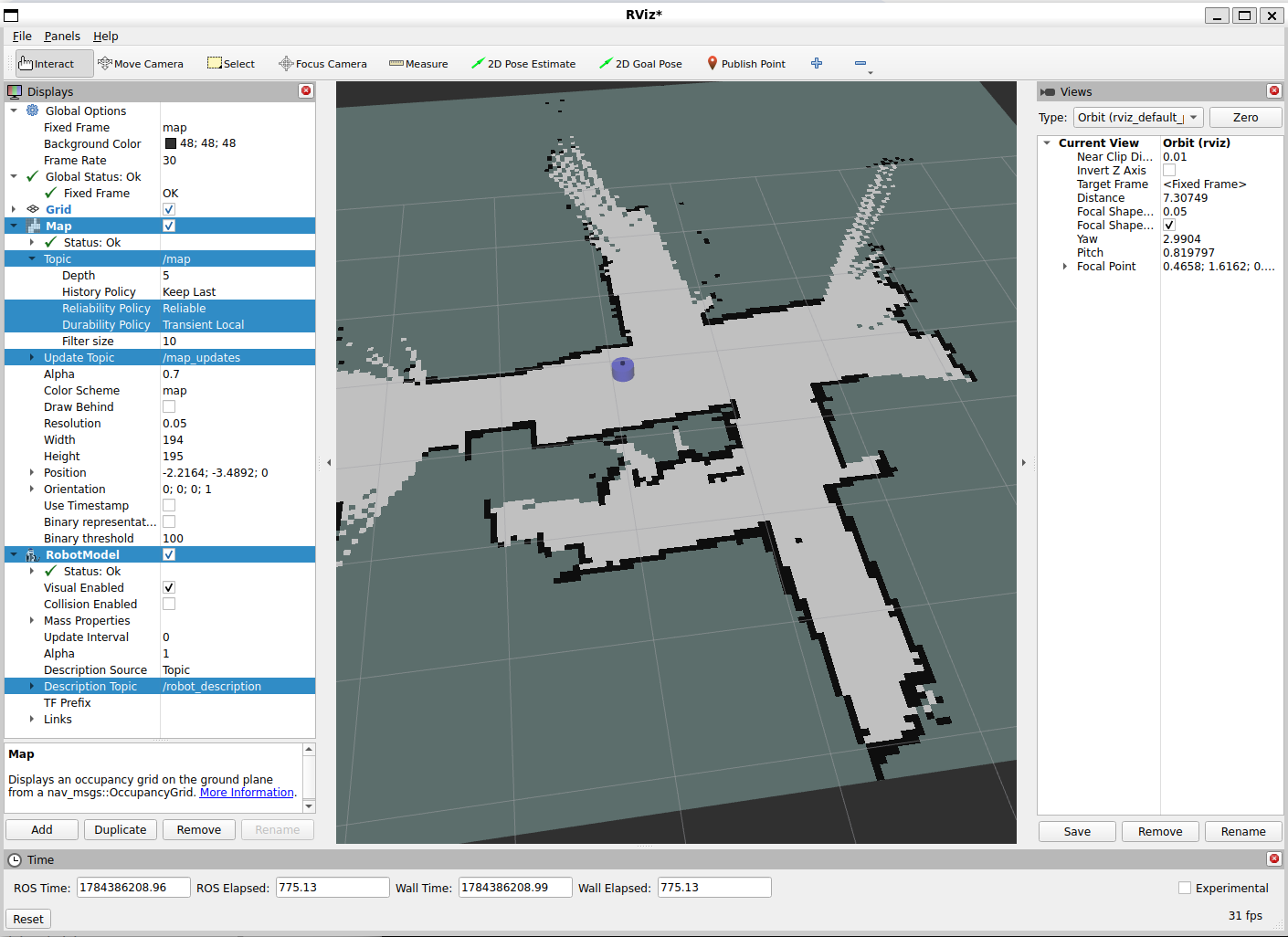
启动rviz2,按By topic方式添加 /map 的 Map 插件,为了清晰显示机器人当前位置,添加RobotModel插件,将Description Topic设置为/robot_description
rviz2
启动键盘控制程序,一定要按x减速到0.02左右再移动,因为小车重心不稳,且建图需要缓慢移动
ros2 run teleop_twist_keyboard teleop_twist_keyboard
耐心扫描,如前所述,map并非平滑更新,而是隔一段时间后跳变
注意事项:
- 确保话题
/scan、/odom正常发布,使用ros2 topic echo查看 - 确保TF变换树正确,可使用
rqt插件查看,odom->base_footprint->base_link->laser_link,map->odom由SLAM-TOOLBOX发布
- 保存地图
使用map_saver_cli,从topic map保存名为fishbot_map的地图
ros2 run nav2_map_server map_saver_cli -t map -f fishbot_map
当前路径下会生成两个文件:fishbot_map.pgm 和 fishbot_map.yaml
导航
使用Nav2功能包进行导航,安装:
sudo apt install ros-$ROS_DISTRO-navigation2
sudo apt install ros-$ROS_DISTRO-nav2-bringup
nav2-bringup提供了nav2默认配置文件,创建一个功能包用来管理launch与配置文件
cd ~/fishbot_ws/src
ros2 pkg create fishbot_navigation2
cd fishbot_navigation2
# 配置文件
mkdir config
# launch文件
mkdir launch
# 地图文件
mkdir maps
Nav2配置
复制默认nav2配置文件到config目录下
cp /opt/ros/$ROS_DISTRO/share/nav2_bringup/params/nav2_params.yaml config/
调小nav2配置文件中costmap的机器人半径参数,以便在窄通道运行:
local_costmap:
  local_costmap:
    ros__parameters:
      ...
      robot_radius: 0.08

global_costmap:
  global_costmap:
    ros__parameters:
      ...
      robot_radius: 0.08
更多配置参看nav2 configuration
地图
将扫描保存的地图文件fishbot_map.pgm和fishbot_map.yaml拷贝到fishbot_navigation2/map/目录下。
Launch文件
编写fishbot_navigation2/launch/navigation2.launch.py,启动导航
import os
import launch
import launch_ros
from ament_index_python.packages import get_package_share_directory
from launch.launch_description_sources import PythonLaunchDescriptionSource


def generate_launch_description():
    # 获取与拼接默认路径
    fishbot_navigation2_dir = get_package_share_directory(
        'fishbot_navigation2')
    nav2_bringup_dir = get_package_share_directory('nav2_bringup')
    rviz_config_dir = os.path.join(
        nav2_bringup_dir, 'rviz', 'nav2_default_view.rviz')

    # 创建 Launch 配置
    use_sim_time = launch.substitutions.LaunchConfiguration(
        'use_sim_time', default='false')
    map_yaml_path = launch.substitutions.LaunchConfiguration(
        'map', default=os.path.join(fishbot_navigation2_dir, 'maps', 'fishbot_map.yaml'))
    nav2_param_path = launch.substitutions.LaunchConfiguration(
        'params_file', default=os.path.join(fishbot_navigation2_dir, 'config', 'nav2_params.yaml'))

    return launch.LaunchDescription([
        # 声明新的 Launch 参数
        launch.actions.DeclareLaunchArgument('use_sim_time', default_value=use_sim_time,
                                             description='Use simulation (Gazebo) clock if true'),
        launch.actions.DeclareLaunchArgument('map', default_value=map_yaml_path,
                                             description='Full path to map file to load'),
        launch.actions.DeclareLaunchArgument('params_file', default_value=nav2_param_path,
                                             description='Full path to param file to load'),

        launch.actions.IncludeLaunchDescription(
            PythonLaunchDescriptionSource(
                [nav2_bringup_dir, '/launch', '/bringup_launch.py']),
            # 使用 Launch 参数替换原有参数
            launch_arguments={
                'map': map_yaml_path,
                'use_sim_time': use_sim_time,
                'params_file': nav2_param_path}.items(),
        ),
        launch_ros.actions.Node(
            package='rviz2',
            executable='rviz2',
            name='rviz2',
            arguments=['-d', rviz_config_dir],
            parameters=[{'use_sim_time': use_sim_time}],
            output='screen'),
    ])
该launch文件整合了nav2-bringup的bringup_launch.py,并使用其默认rviz2配置文件nav2_default_view.rviz进行rviz可视化
修改CMakeLists.txt,安装launch、配置文件、地图
install(DIRECTORY
  launch
  config
  maps
  DESTINATION share/${PROJECT_NAME}
)
构建以进行文件拷贝
cd ~/fishbot_ws
colcon build
启动导航
启动机器人:
# TF变换发布
ros2 launch fishbot_bringup fishbot_bringup.launch.py
# Micro-ROS Agent
ros2 run micro_ros_agent micro_ros_agent udp4 --port 8888
# 雷达驱动
python3 virt_serial.py
ros2 launch ydlidar ydlidar_launch.py
确保/scan、/odom等话题数据正常后,启动导航(可能出现错误):
colcon build
source install/setup.bash
ros2 launch fishbot_navigation2 navigation2.launch.py
踩坑:
- 不知为何,较新版本的nav2
amcl节点订阅/scan时使用的QoS策略为Reliable,与雷达发布使用best effort策略冲突
# 错误情况:看到amcl节点使用不兼容的QoS策略
ros2 topic info /scan --verbose
缓解方法:Reliable的的的订阅者不能匹配best effort的发布者,但反之可以,所以可以修改雷达发布的/scan话题QoS策略为Reliable,这样仍可匹配其它订阅该话题的best effort节点。
ydlidar_ros2/src/ydlidar_node.cpp:
  // auto laser_pub = node->create_publisher<sensor_msgs::msg::LaserScan>("scan", rclcpp::SensorDataQoS());
  rclcpp::QoS scan_qos(rclcpp::KeepLast(10));
  scan_qos.reliable();
  auto laser_pub = node->create_publisher<sensor_msgs::msg::LaserScan>("scan", scan_qos);
- nav2较新版本发布
/cmd_vel时使用的是geometry_msgs/msg/TwistStamped类型,而小车订阅的/cmd_vel消息类型为geometry_msgs/msg/Twist
# 错误情况:看到两种消息类型混杂
ros2 topic info /cmd_vel --verbose
缓解有两种方法
1. 升级底层驱动fishbot_motion_control订阅的消息类型
2. 修改nav2配置,把发布TwistStamped类型至/cmd_vel的节点改为发布至/cmd_vel_nav,再转接发布Twist消息到/cmd_vel
这里使用第二种办法,修改nav2配置:
collision_monitor:
  ros__parameters:
    base_frame_id: "base_footprint"
    odom_frame_id: "odom"
    cmd_vel_in_topic: "cmd_vel_smoothed"
    cmd_vel_out_topic: "cmd_vel_nav" # 改为发布命令至/cmd_vel_nav话题
简单的python转换脚本cmd_vel_converter.py:
import rclpy
from rclpy.node import Node
from geometry_msgs.msg import TwistStamped, Twist

class CmdVelConverter(Node):
    def __init__(self):
        super().__init__('cmd_vel_converter')

        # 订阅 TwistStamped 话题
        self.subscription = self.create_subscription(
            TwistStamped,
            '/cmd_vel_nav',
            self.listener_callback,
            10)

        # 发布 Twist 话题
        self.publisher_ = self.create_publisher(
            Twist,
            '/cmd_vel',
            10)

    def listener_callback(self, msg: TwistStamped):
        # 提取 TwistStamped 中的 twist 部分
        twist_msg = msg.twist

        # 发布纯 Twist 消息
        self.publisher_.publish(twist_msg)
        self.get_logger().debug('Converted TwistStamped to Twist')

def main(args=None):
    rclpy.init(args=args)
    node = CmdVelConverter()
    try:
        rclpy.spin(node)
    except KeyboardInterrupt:
        pass
    finally:
        node.destroy_node()
        rclpy.shutdown()

if __name__ == '__main__':
    main()
最终启动导航命令
最佳实践是整合成单个launch,这里仅作原理性演示
启动机器人:
# 虚拟串口,雷达转接
python3 virt_serial.py
# 发布TF变换:odom->base_footprint->base_link->laser_link
ros2 launch fishbot_bringup fishbot_bringup.launch.py
# ROS信息相关的Agent
ros2 run micro_ros_agent micro_ros_agent udp4 --port 8888
# 雷达驱动
ros2 launch ydlidar ydlidar_launch.py
# /cmd_vel_nav转接/cmd_vel
python3 cmd_vel_converter.py
启动导航:
ros2 launch fishbot_navigation2 navigation2.launch.py
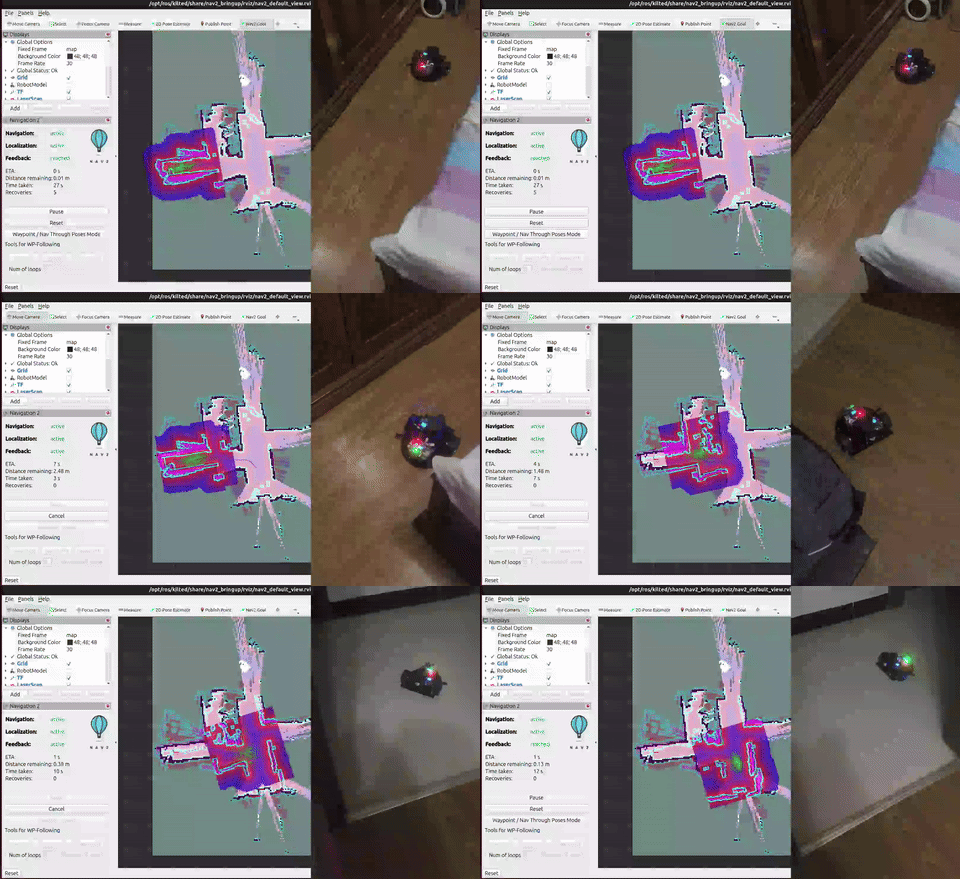
使用2D Pose Estimate设定初始位姿后,rviz2上显示costmap与雷达点阵图。
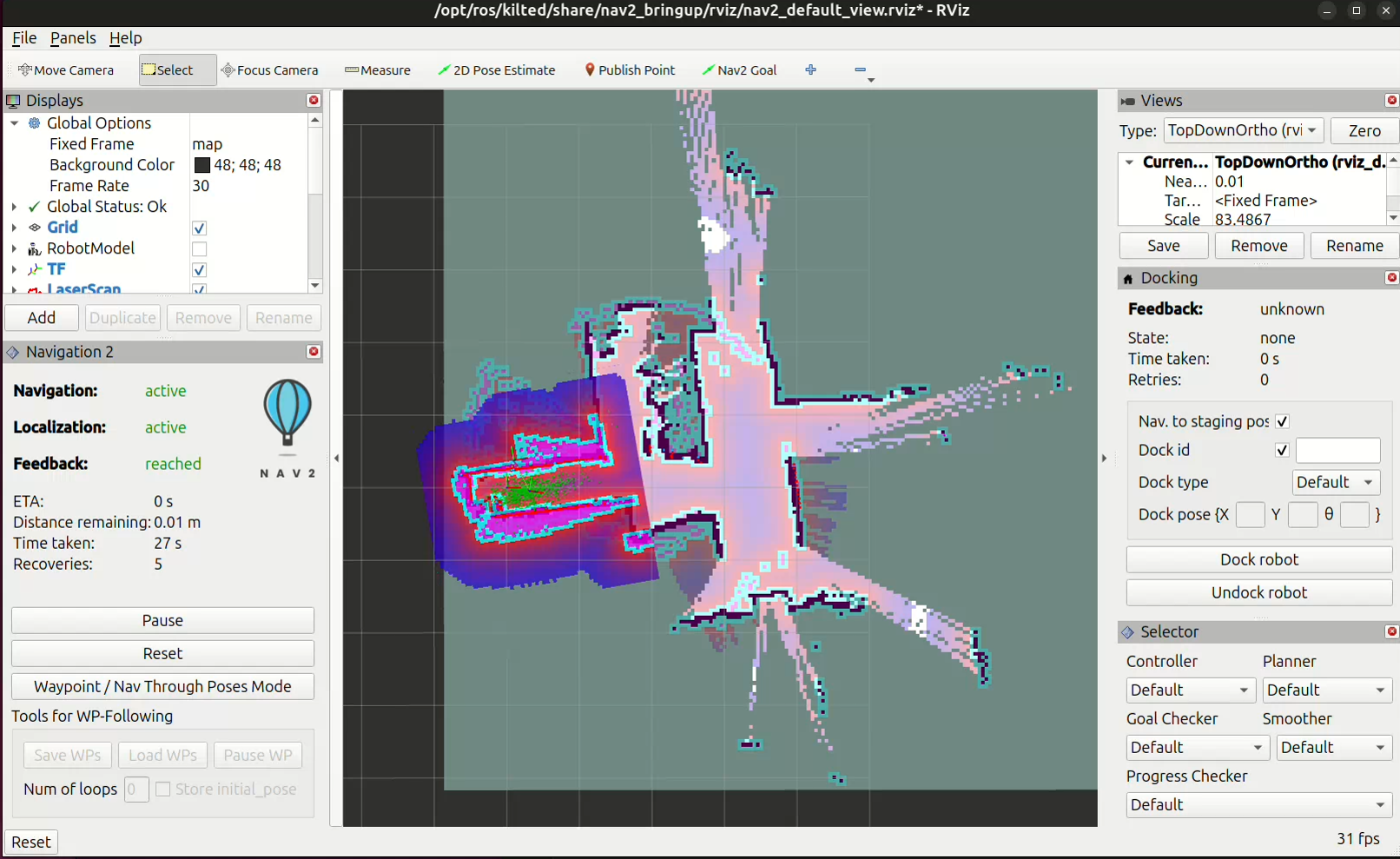
使用Nav2 Goal设定方向后,机器人自动计算路线并导航。
留言