ROS2-SLAM与导航
SLAM是同步定位与地图构建(Simultaneous Localization And Mapping)的缩写,机器人通过自身传感器数据处理进行位置估计,同时通过不断移动完成对整个未知环境的地图构建
1. 安装slam_toolbox
sudo apt update
sudo apt install ros-kilted-slam-toolbox
sudo apt install ros-kilted-nav2-map-server
2. SLAM建图
- 启动机器人和Gazebo仿真环境
source install/setup.bash
ros2 launch fishbot_description gazebo.launch.py
- 启动异步建图
ros2 launch slam_toolbox online_async_launch.py
- 打开RViz2
rviz2
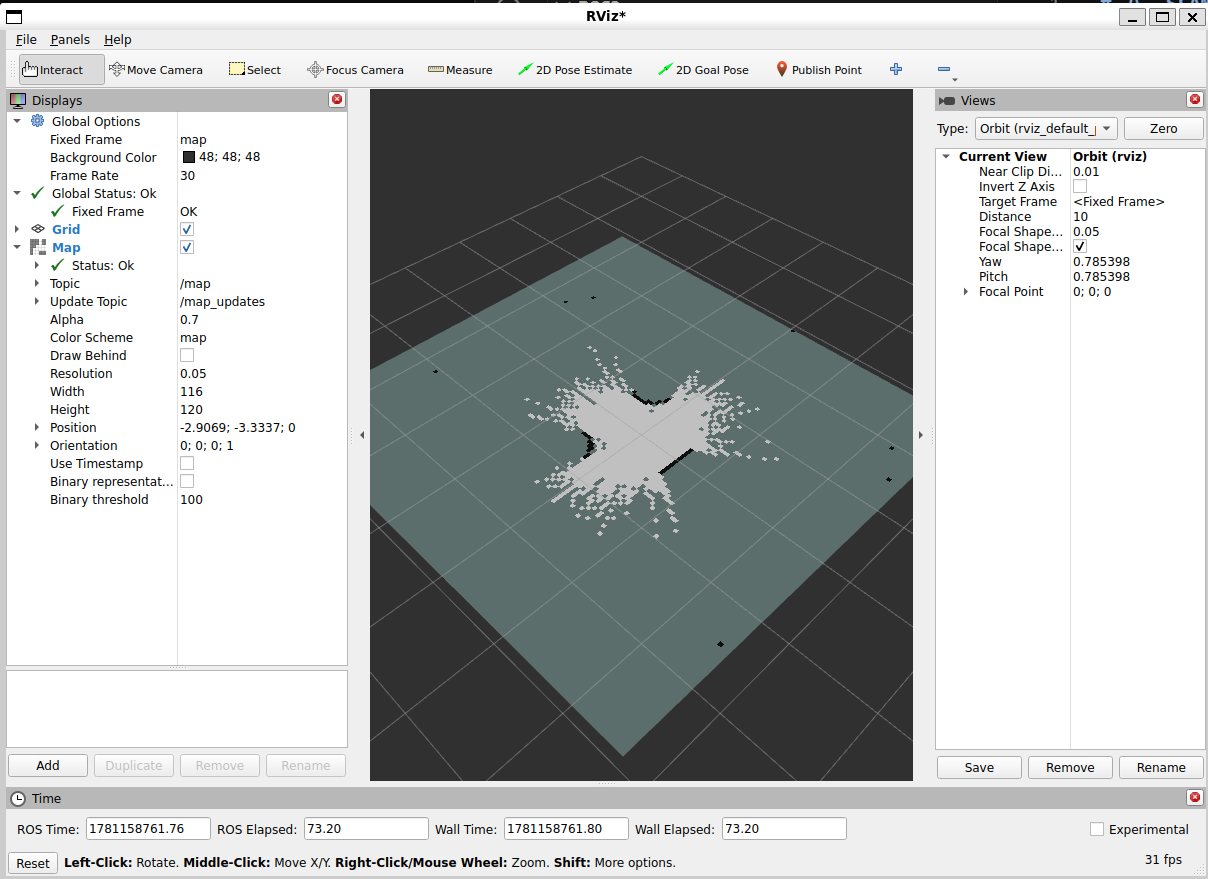
添加Map插件,设置Topic为/map, Update Topic为/map_updates
此时,如rviz2中显示了部分地图:
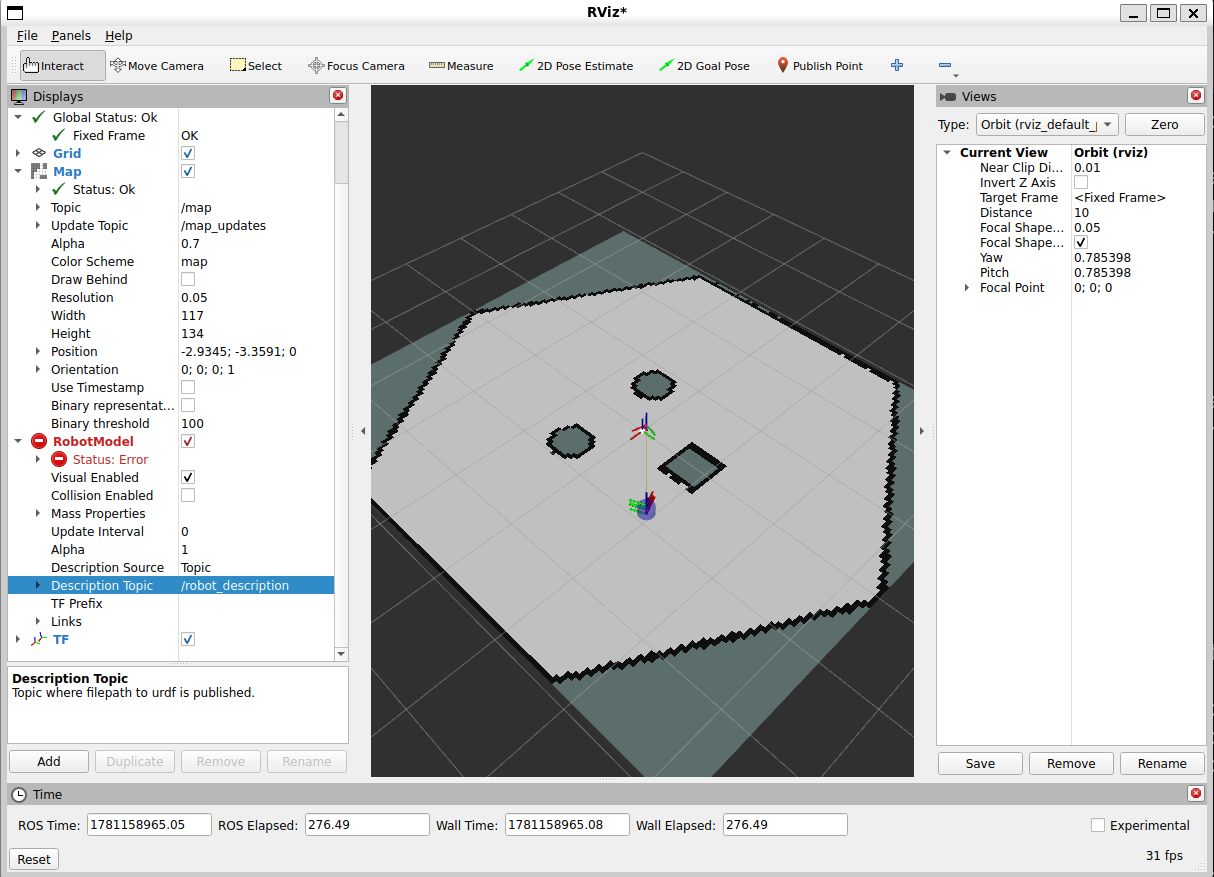
- 通过键盘控制机器人移动,继续完善地图
ros2 run teleop_twist_keyboard teleop_twist_keyboard
- 保存地图
在rviz2中,选择菜单栏Panels->Add New Panel,选择SlamToolboxPlugin
在新出现的面板中的Save Map栏中输入地图名称,点击Save Map按钮
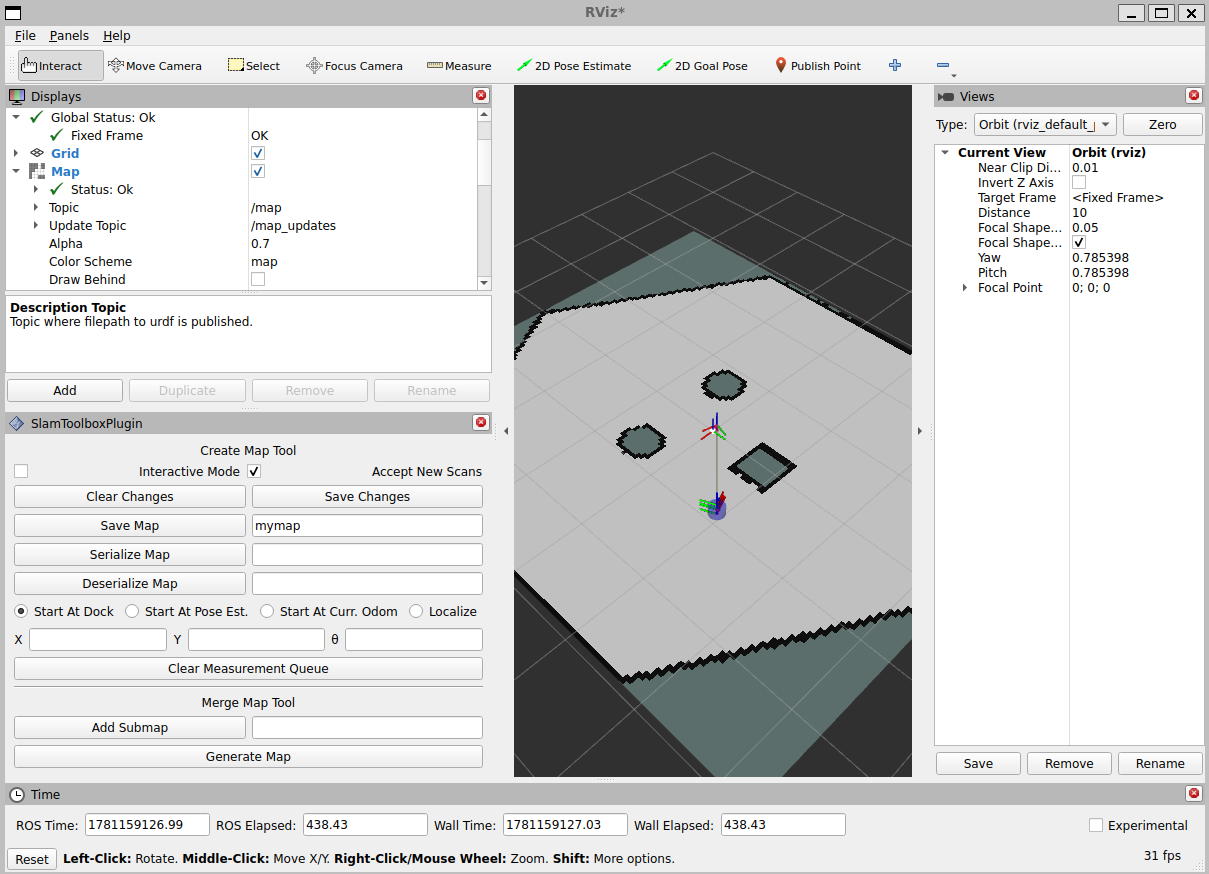
可看到当前目录下生成了地图元数据mymap.yaml和灰度地图图片mymap.pgm
这是一个栅格地图,地图中的每个像素点代表环境中的一个小区域,像素值为0(黑色)表示该区域完全被占据,像素值为255(白色)表示该区域完全空闲,中间值表示该区域不确定。
- 加载地图
启动地图服务器
ros2 run nav2_map_server map_server --ros-args --param yaml_filename:=mymap.yaml
启动RViz2,添加Map插件,设置Topic为/map
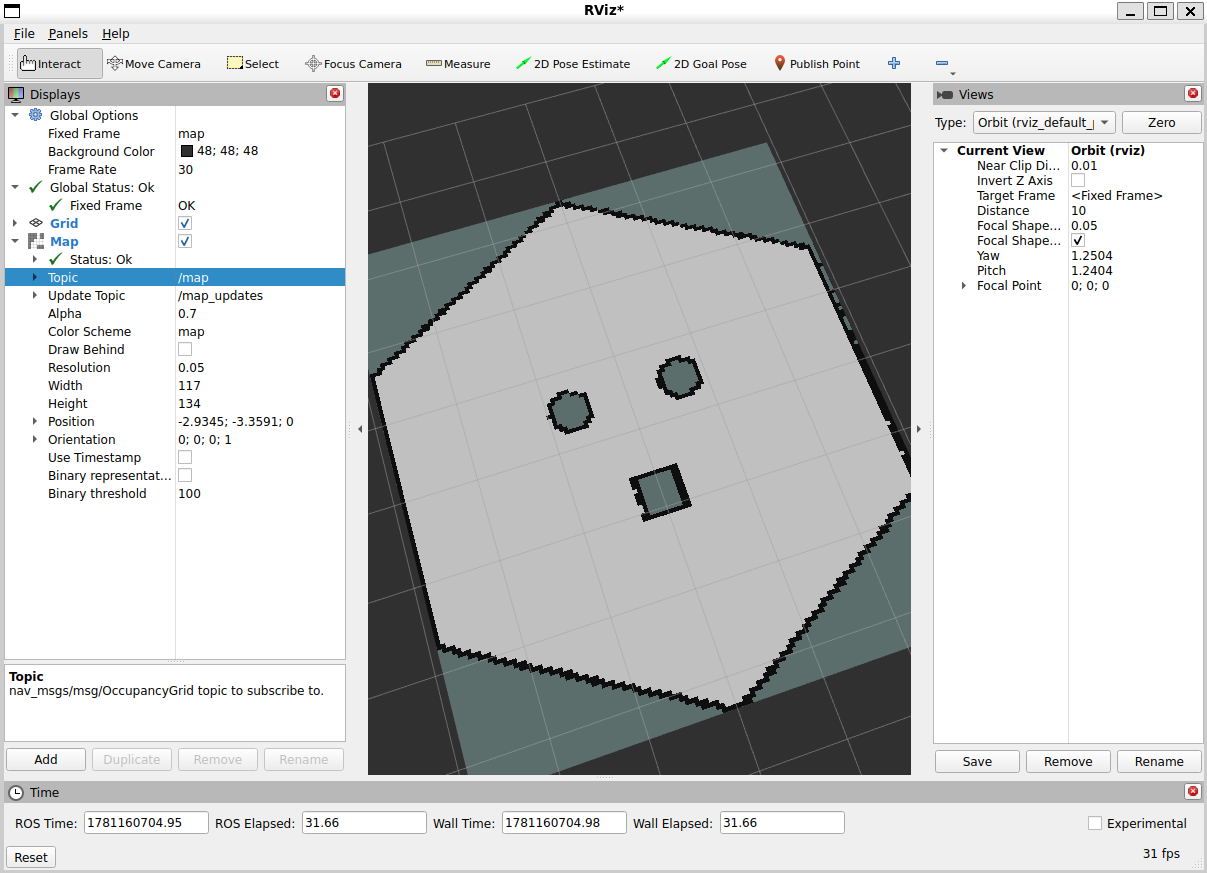
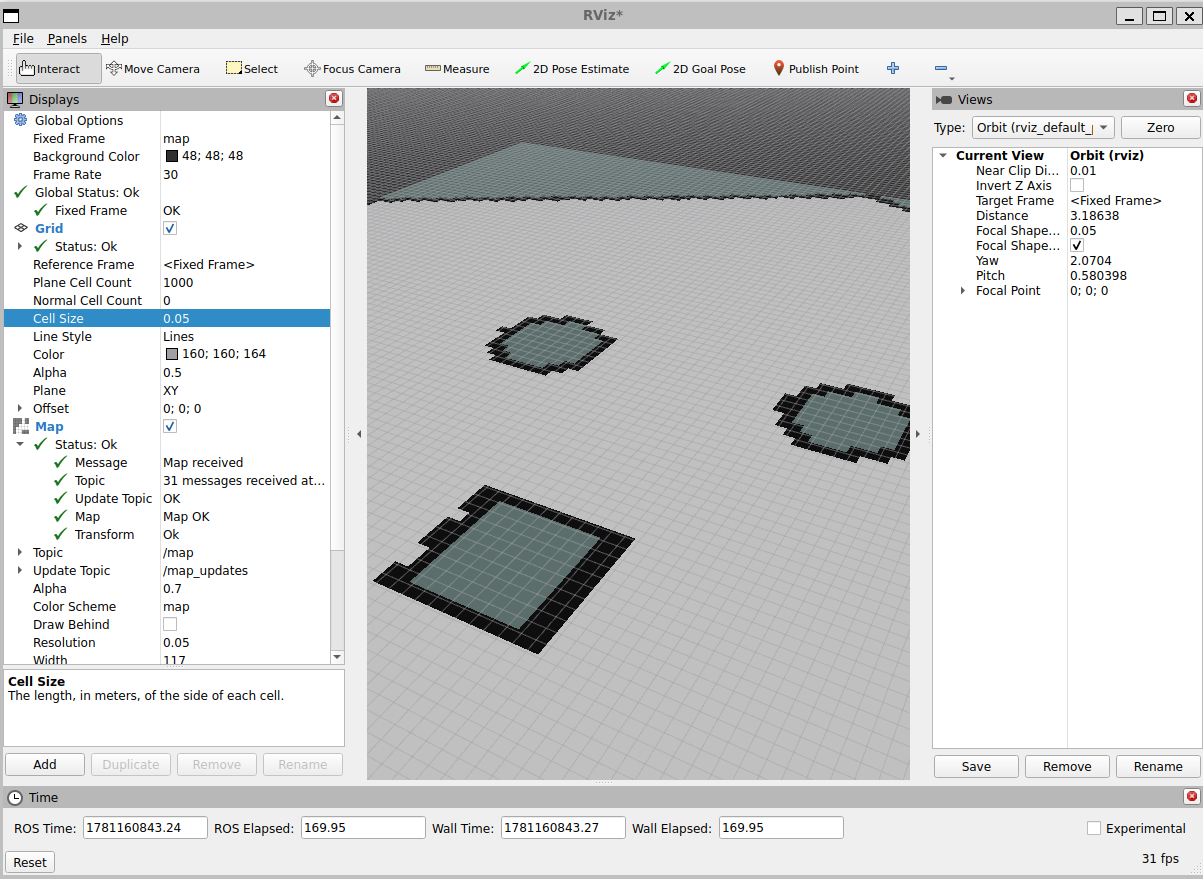
在Grid中将Plane Cell Count调高为1000,Grid Cell Size调低为0.05,可以看到地图栅格占据情况:
- 地图编辑
使用一般的图像编辑方法即可,可以使用PS等软件或在线工具编辑。
map_server也支持png等格式的地图图片,修改yaml文件中的image字段即可
3. Nav2导航
Nav2是ROS2中的导航框架,提供了路径规划、运动控制等功能,可以基于SLAM建图的地图进行导航。
Nav2架构图:
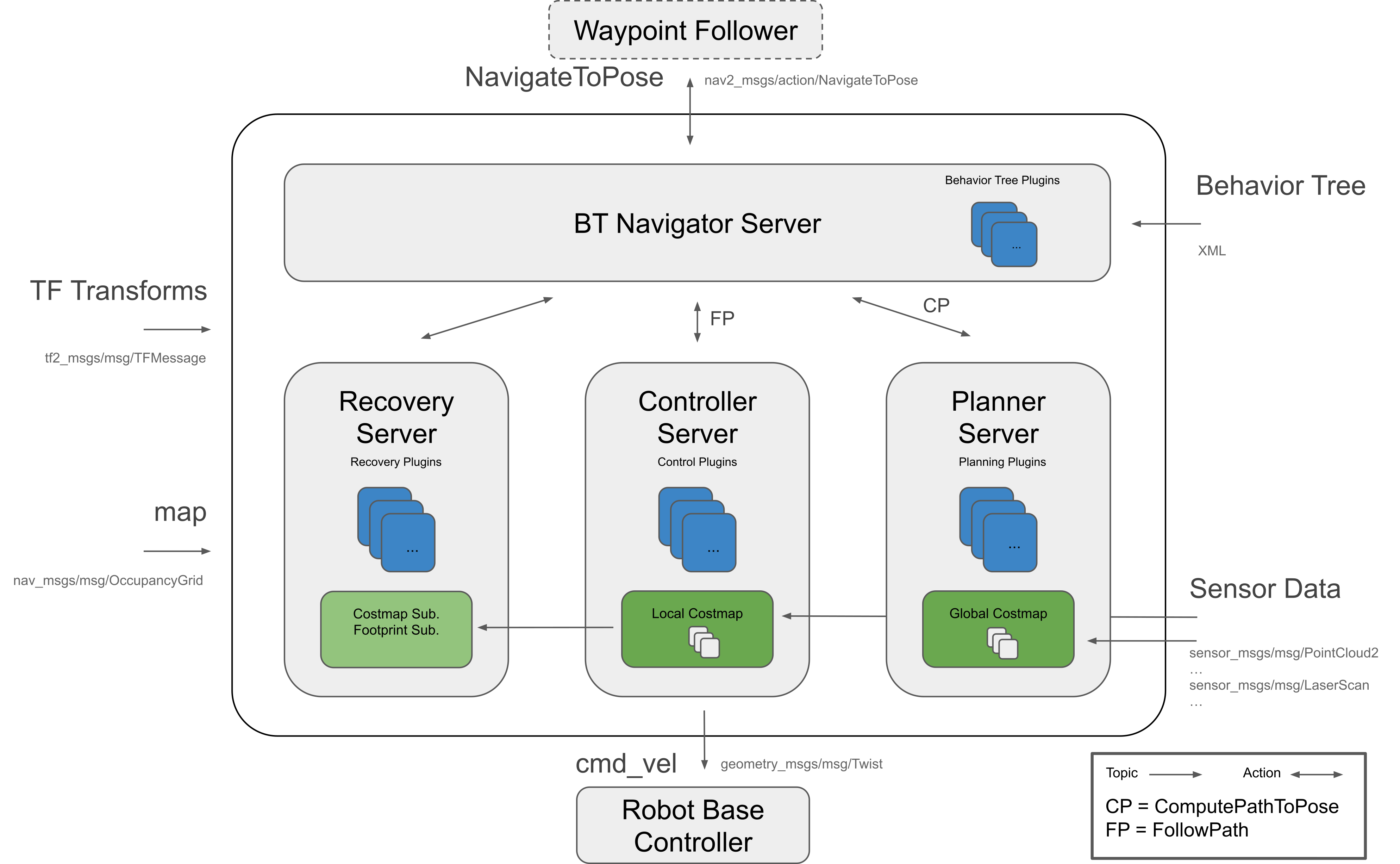
- 行为树导航服务(BT Navigator Server):通过这个大的服务,组织和调用下面三个小服务
行为树 (BT) 在复杂的机器人任务中变得越来越普遍。它们是待完成任务的树形结构。行为树为定义多步或多状态应用程序创建了一个更具可扩展性和人类可理解性的框架。这与有限状态机 (FSM) 相反,后者可能有几十个状态和数百个状态过渡。
- 路径规划服务(Planner Server):计算出一条从起点到终点的路径
- 运动控制服务(Controller Server):控制机器人按照路径移动
- 恢复行为服务(Recovery Server):当机器人遇到障碍物或无法前进时,执行后退、旋转等,以尝试脱困
在机器人导航的时候,仅仅靠一张SLAM建立的原始地图是不够的,机器人在运动过程中可能会出现新的障碍物,也有可能发现原始地图中某一块的障碍物消失了,所以在机器人导航过程中维护的地图是一个动态的地图,叫做代价地图(Costmap),分为全局代价地图(Global Costmap)和局部代价地图(Local Costmap)。
生命周期节点框架和Action通信机制在整个项目中被广泛使用。
REP-105标准规定至少必须为机器人构造一个包含map -> odom -> base_link -> [sensorframes] 的完整TF树。全局定位系统(如slam)通常会发布map->odom的TF变换,里程计系统通常会发布odom->base_link的TF变换,里程计可以来自许多数据源,包括激光雷达、IMU等。
4. Nav2导航
- 安装Nav2
sudo apt install ros-$ROS_DISTRO-navigation2 ros-$ROS_DISTRO-nav2-bringup '~ros-$ROS_DISTRO-turtlebot3-.*'
- 创建功能包:
ros2 pkg create fishbot_navigation2 --dependencies nav2_bringup
cd fishbot_navigation2
mkdir launch config maps param rviz
-
将地图文件
mymap.yaml和mymap.pgm复制到maps目录下 -
在param目录下创建导航参数文件
fishbot_nav2.yaml,内容如下:
# Adaptive Monte Carlo Localization (AMCL) 自适应蒙特卡洛定位
amcl:
  ros__parameters:
    use_sim_time: True
    alpha1: 0.2
    alpha2: 0.2
    alpha3: 0.2
    alpha4: 0.2
    alpha5: 0.2
    base_frame_id: "base_link"
    beam_skip_distance: 0.5
    beam_skip_error_threshold: 0.9
    beam_skip_threshold: 0.3
    do_beamskip: false
    global_frame_id: "map"
    lambda_short: 0.1
    laser_likelihood_max_dist: 2.0
    laser_max_range: 100.0
    laser_min_range: -1.0
    laser_model_type: "likelihood_field"
    max_beams: 60
    max_particles: 2000
    min_particles: 500
    odom_frame_id: "odom"
    pf_err: 0.05
    pf_z: 0.99
    recovery_alpha_fast: 0.0
    recovery_alpha_slow: 0.0
    resample_interval: 1
    robot_model_type: "nav2_amcl::DifferentialMotionModel"
    save_pose_rate: 0.5
    sigma_hit: 0.2
    tf_broadcast: true
    transform_tolerance: 10.0
    update_min_a: 0.2
    update_min_d: 0.25
    z_hit: 0.5
    z_max: 0.05
    z_rand: 0.5
    z_short: 0.05
    scan_topic: scan

amcl_map_client:
  ros__parameters:
    use_sim_time: True

amcl_rclcpp_node:
  ros__parameters:
    use_sim_time: True
# Behavior Tree Navigator Server 导航行为树
bt_navigator:
  ros__parameters:
    use_sim_time: True
    global_frame: map
    robot_base_frame: base_link
    odom_topic: /odom
    bt_loop_duration: 10
    default_server_timeout: 20

bt_navigator_rclcpp_node:
  ros__parameters:
    use_sim_time: True
# 控制器服务器
controller_server:
  ros__parameters:
    use_sim_time: True
    controller_frequency: 20.0
    min_x_velocity_threshold: 0.001
    min_y_velocity_threshold: 0.5
    min_theta_velocity_threshold: 0.001
    failure_tolerance: 0.3
    progress_checker_plugin: "progress_checker"
    goal_checker_plugins: ["general_goal_checker"] # "precise_goal_checker"
    controller_plugins: ["FollowPath"]

    # Progress checker parameters
    progress_checker:
      plugin: "nav2_controller::SimpleProgressChecker"
      required_movement_radius: 0.5
      movement_time_allowance: 10.0
    # Goal checker parameters
    #precise_goal_checker:
    #  plugin: "nav2_controller::SimpleGoalChecker"
    #  xy_goal_tolerance: 0.25
    #  yaw_goal_tolerance: 0.25
    #  stateful: True
    general_goal_checker:
      stateful: True
      plugin: "nav2_controller::SimpleGoalChecker"
      xy_goal_tolerance: 0.25
      yaw_goal_tolerance: 0.25
    # DWB parameters
    FollowPath:
      plugin: "dwb_core::DWBLocalPlanner"
      debug_trajectory_details: True
      min_vel_x: 0.01
      min_vel_y: 0.01
      max_vel_x: 0.26
      max_vel_y: 0.26
      max_vel_theta: 1.0
      min_speed_xy: 0.01
      max_speed_xy: 0.26
      min_speed_theta: 0.01
      # Add high threshold velocity for turtlebot 3 issue.
      # https://github.com/ROBOTIS-GIT/turtlebot3_simulations/issues/75
      acc_lim_x: 2.5
      acc_lim_y: 0.0
      acc_lim_theta: 3.2
      decel_lim_x: -2.5
      decel_lim_y: 0.0
      decel_lim_theta: -3.2
      vx_samples: 20
      vy_samples: 5
      vtheta_samples: 20
      sim_time: 1.7
      linear_granularity: 0.05
      angular_granularity: 0.025
      transform_tolerance: 0.2
      xy_goal_tolerance: 0.25
      trans_stopped_velocity: 0.005
      short_circuit_trajectory_evaluation: True
      stateful: True
      critics: ["RotateToGoal", "Oscillation", "BaseObstacle", "GoalAlign", "PathAlign", "PathDist", "GoalDist"]
      BaseObstacle.scale: 0.02
      PathAlign.scale: 32.0
      PathAlign.forward_point_distance: 0.1
      GoalAlign.scale: 24.0
      GoalAlign.forward_point_distance: 0.1
      PathDist.scale: 32.0
      GoalDist.scale: 24.0
      RotateToGoal.scale: 32.0
      RotateToGoal.slowing_factor: 5.0
      RotateToGoal.lookahead_time: -1.0

controller_server_rclcpp_node:
  ros__parameters:
    use_sim_time: True
# 局部代价地图
local_costmap:
  local_costmap:
    ros__parameters:
      update_frequency: 5.0
      publish_frequency: 2.0
      global_frame: odom
      robot_base_frame: base_link
      use_sim_time: True
      rolling_window: true
      width: 3
      height: 3
      resolution: 0.05
      robot_radius: 0.12 # 机器人半径
      plugins: ["voxel_layer", "inflation_layer"]
      inflation_layer:
        plugin: "nav2_costmap_2d::InflationLayer"
        cost_scaling_factor: 3.0
        inflation_radius: 0.2 # 碰撞半径,机器人半径加上安全距离
      voxel_layer:
        plugin: "nav2_costmap_2d::VoxelLayer"
        enabled: True
        publish_voxel_map: True
        origin_z: 0.0
        z_resolution: 0.05
        z_voxels: 16
        max_obstacle_height: 2.0
        mark_threshold: 0
        observation_sources: scan
        scan:
          topic: /scan
          max_obstacle_height: 2.0
          clearing: True
          marking: True
          data_type: "LaserScan"
          raytrace_max_range: 3.0
          raytrace_min_range: 0.0
          obstacle_max_range: 2.5
          obstacle_min_range: 0.0
      static_layer:
        map_subscribe_transient_local: True
      always_send_full_costmap: True
  local_costmap_client:
    ros__parameters:
      use_sim_time: True
  local_costmap_rclcpp_node:
    ros__parameters:
      use_sim_time: True
# 全局代价地图
global_costmap:
  global_costmap:
    ros__parameters:
      update_frequency: 1.0
      publish_frequency: 1.0
      global_frame: map
      robot_base_frame: base_link
      use_sim_time: True
      robot_radius: 0.12 # 机器人半径
      resolution: 0.05
      track_unknown_space: true
      plugins: ["static_layer", "obstacle_layer", "inflation_layer"]
      obstacle_layer:
        plugin: "nav2_costmap_2d::ObstacleLayer"
        enabled: True
        observation_sources: scan
        scan:
          topic: /scan
          max_obstacle_height: 2.0
          clearing: True
          marking: True
          data_type: "LaserScan"
          raytrace_max_range: 3.0
          raytrace_min_range: 0.0
          obstacle_max_range: 2.5
          obstacle_min_range: 0.0
      static_layer:
        plugin: "nav2_costmap_2d::StaticLayer"
        map_subscribe_transient_local: True
      # 膨胀层,将障碍物周围一定范围内的区域标记为不可通行,以考虑机器人本身的尺寸和安全距离
      inflation_layer:
        plugin: "nav2_costmap_2d::InflationLayer"
        cost_scaling_factor: 3.0
        inflation_radius: 0.2 # 碰撞半径,机器人半径加上安全距离
      always_send_full_costmap: True
  global_costmap_client:
    ros__parameters:
      use_sim_time: True
  global_costmap_rclcpp_node:
    ros__parameters:
      use_sim_time: True

map_server:
  ros__parameters:
    use_sim_time: True
    yaml_filename: "turtlebot3_world.yaml"

map_saver:
  ros__parameters:
    use_sim_time: True
    save_map_timeout: 5.0
    free_thresh_default: 0.25
    occupied_thresh_default: 0.65
    map_subscribe_transient_local: True
# 规划服务器
planner_server:
  ros__parameters:
    expected_planner_frequency: 20.0
    use_sim_time: True
    planner_plugins: ["GridBased"]
    GridBased:
      plugin: "nav2_navfn_planner::NavfnPlanner"
      tolerance: 0.5
      use_astar: false
      allow_unknown: true

planner_server_rclcpp_node:
  ros__parameters:
    use_sim_time: True

smoother_server:
  ros__parameters:
    use_sim_time: True
    smoother_plugins: ["simple_smoother"]
    simple_smoother:
      plugin: "nav2_smoother::SimpleSmoother"
      tolerance: 1.0e-10
      max_its: 1000
      do_refinement: True

behavior_server:
  ros__parameters:
    costmap_topic: local_costmap/costmap_raw
    footprint_topic: local_costmap/published_footprint
    cycle_frequency: 10.0
    behavior_plugins: ["spin", "backup", "drive_on_heading", "wait"]
    spin:
      plugin: "nav2_behaviors::Spin"
    backup:
      plugin: "nav2_behaviors::BackUp"
    drive_on_heading:
      plugin: "nav2_behaviors::DriveOnHeading"
    wait:
      plugin: "nav2_behaviors::Wait"
    global_frame: odom
    robot_base_frame: base_link
    transform_tolerance: 0.1
    use_sim_time: true
    simulate_ahead_time: 2.0
    max_rotational_vel: 1.0
    min_rotational_vel: 0.4
    rotational_acc_lim: 3.2

robot_state_publisher:
  ros__parameters:
    use_sim_time: True

waypoint_follower:
  ros__parameters:
    loop_rate: 20
    stop_on_failure: false
    waypoint_task_executor_plugin: "wait_at_waypoint"
    wait_at_waypoint:
      plugin: "nav2_waypoint_follower::WaitAtWaypoint"
      enabled: True
      waypoint_pause_duration: 200

collision_monitor:
  ros__parameters:
    use_sim_time: True
    update_frequency: 10.0
    observation_sources: ["scan"]
    scan:
      type: "scan"
      topic: "/scan"
    polygons: ["circle_stop", "circle_slowdown"]
    circle_stop:
      type: "circle"
      radius: 0.01
      action_type: "stop"
    circle_slowdown:
      type: "circle"
      radius: 0.01
      action_type: "slowdown"
      scale_factor: 0.01

docking_server:
  ros__parameters:
    use_sim_time: True
    controller_frequency: 50.0
    dock_plugins: ["simple_dock"]
    simple_dock:
      plugin: "opennav_docking::SimpleChargingDock"
      docking_threshold: 0.05
      use_battery_status: false
- 在launch目录下编写launch文件
navigation2.launch.py
'''
作者: 小鱼
公众号: 鱼香ROS
QQ交流群: 2642868461
描述: Nav2 launch启动文件
'''
import os
from ament_index_python.packages import get_package_share_directory
from launch import LaunchDescription
from launch.actions import IncludeLaunchDescription
from launch.launch_description_sources import PythonLaunchDescriptionSource
from launch.substitutions import LaunchConfiguration
from launch_ros.actions import Node


def generate_launch_description():
    #=============================1.定位到包的地址=============================================================
    fishbot_navigation2_dir = get_package_share_directory('fishbot_navigation2')
    nav2_bringup_dir = get_package_share_directory('nav2_bringup')


    #=============================2.声明参数,获取配置文件路径===================================================
    # use_sim_time 这里要设置成true,因为gazebo是仿真环境,其时间是通过/clock话题获取,而不是系统时间
    use_sim_time = LaunchConfiguration('use_sim_time', default='true')
    map_yaml_path = LaunchConfiguration('map',default=os.path.join(fishbot_navigation2_dir,'maps','mymap.yaml')) # 地图路径
    nav2_param_path = LaunchConfiguration('params_file',default=os.path.join(fishbot_navigation2_dir,'param','fishbot_nav2.yaml')) # Nav2参数文件路径
    rviz_config_dir = os.path.join(nav2_bringup_dir,'rviz','nav2_default_view.rviz')

    #=============================3.声明启动launch文件,传入:地图路径、是否使用仿真时间以及nav2参数文件==============
    nav2_bringup_launch = IncludeLaunchDescription(
            PythonLaunchDescriptionSource([nav2_bringup_dir,'/launch','/bringup_launch.py']),
            launch_arguments={
                'map': map_yaml_path,
                'use_sim_time': use_sim_time,
                'params_file': nav2_param_path}.items(),
        )
    rviz_node =  Node(
            package='rviz2',
            executable='rviz2',
            name='rviz2',
            arguments=['-d', rviz_config_dir],
            parameters=[{'use_sim_time': use_sim_time}],
            output='screen')

    return LaunchDescription([nav2_bringup_launch,rviz_node])
- 修改CMakeLists.txt:
在CMakeLists.txt中添加install,复制map、配置与launch:
cmake_minimum_required(VERSION 3.5)
project(fishbot_navigation2)

# find dependencies
find_package(ament_cmake REQUIRED)
install(
  DIRECTORY launch param maps
  DESTINATION share/${PROJECT_NAME}
)

ament_package()
- 编译功能包
colcon build --packages-select fishbot_navigation2
- 启动导航
启动之前的机器人和Gazebo仿真环境:
在实验中发现,Nav2的controller_server节点发布的cmd_vel话题类型为geometry_msgs/msg/TwistStamped,而Gazebo仿真环境中的机器人订阅的cmd_vel话题类型为geometry_msgs/msg/Twist。
同时/clock话题同样配置有误
修改gazebo.launch.py桥接器参数:
arguments=[
    '/cmd_vel@geometry_msgs/msg/TwistStamped@gz.msgs.Twist',
    '/odom@nav_msgs/msg/Odometry@gz.msgs.Odometry',
    '/imu@sensor_msgs/msg/Imu@gz.msgs.IMU',
    '/scan@sensor_msgs/msg/LaserScan@gz.msgs.LaserScan',
    '/clock@rosgraph_msgs/msg/Clock[gz.msgs.Clock',
    '/model/fishbot/tf@tf2_msgs/msg/TFMessage[gz.msgs.Pose_V',
],
colcon build --packages-select fishbot_description
source install/setup.bash
ros2 launch fishbot_description gazebo.launch.py
启动导航:
source install/setup.bash
ros2 launch fishbot_navigation2 navigation2.launch.py
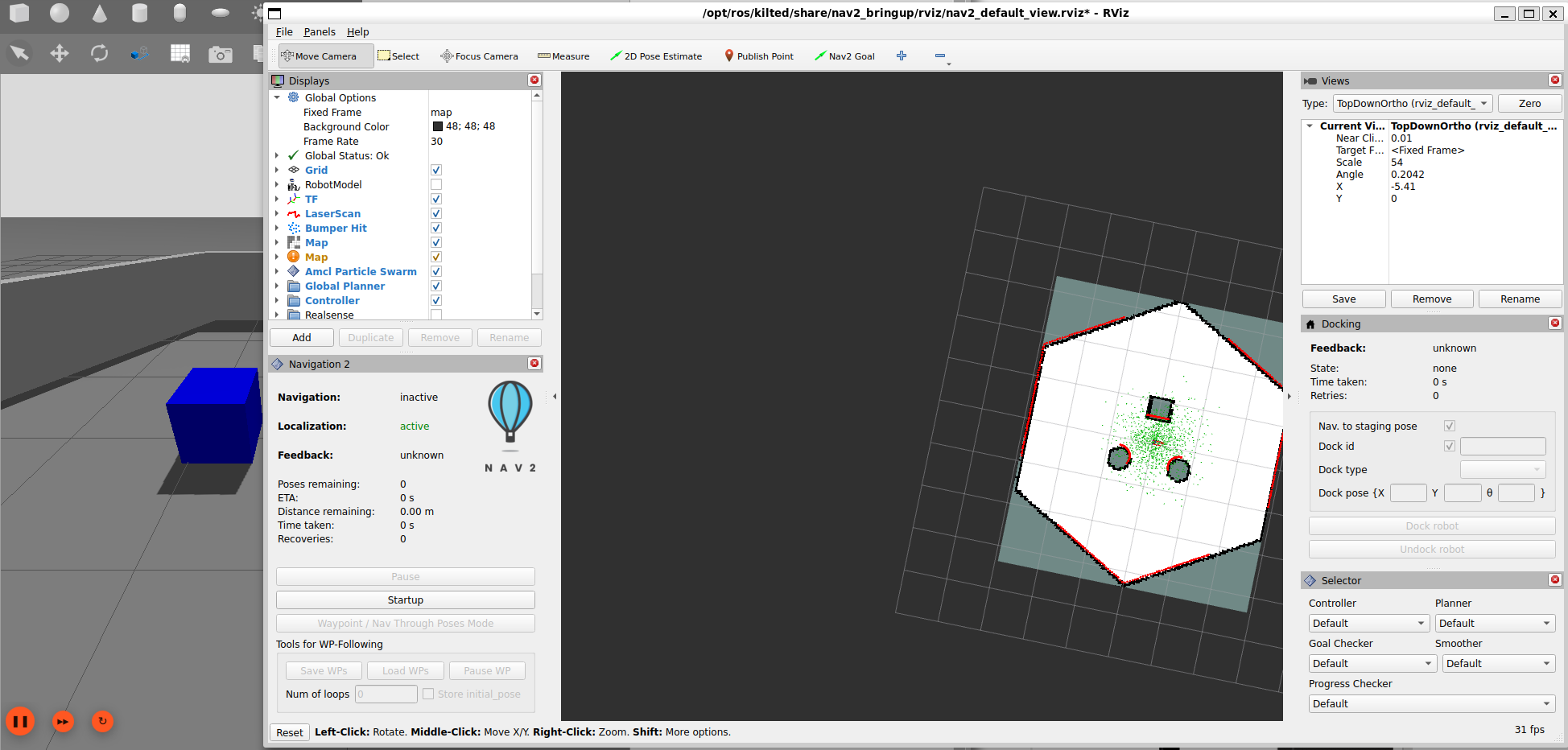
在RViz2中,点击2D Pose Estimate工具,在地图上点击小车位置并拖向小车前方,设置小车初始位姿
设置完成等待一段时间后成功显示雷达点阵图:
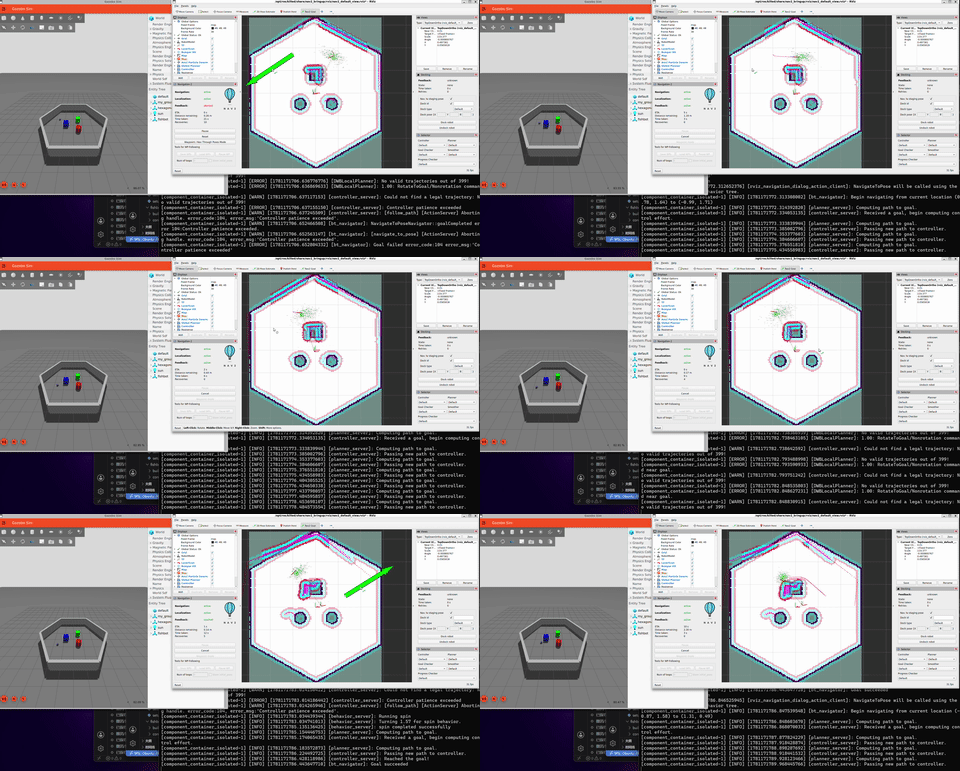
点击Nav2 Goal工具,在地图上点击目标位置并拖向目标前方,设置导航目标位姿,Nav2自动计算路径并控制小车运动:
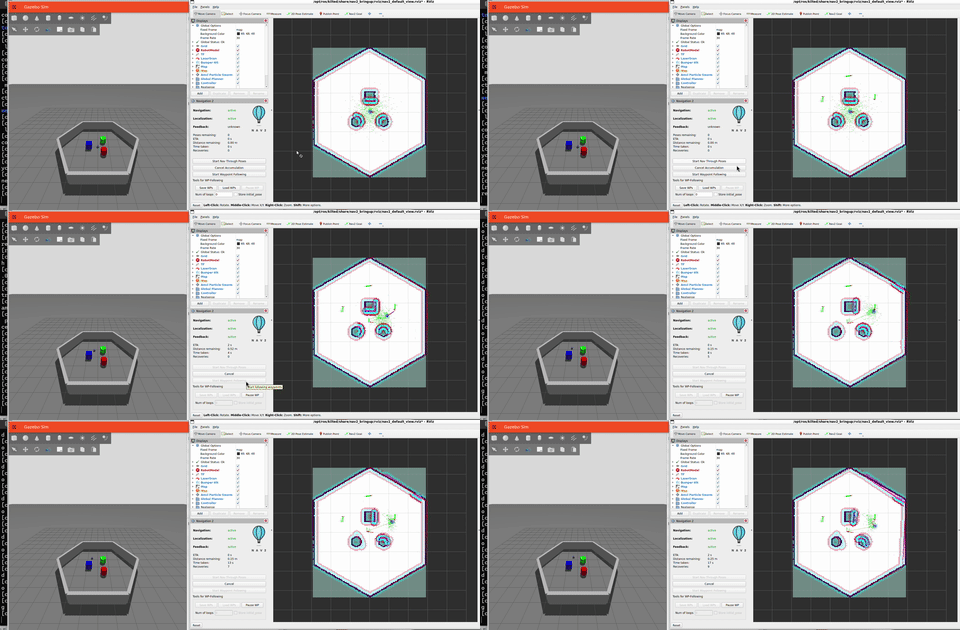
在左下角Navigation2面板中,单击Waypoints / Nav Through Poses Mode切换为多点导航模式,多次使用Nav2 Goal工具设置多个导航目标位姿,单击Start Waypoint Following按钮,Nav2将按照设置的顺序依次导航到每个目标位姿:
留言